


- College/Department Dean or VP
- Product Manager Committee
- Security
- OIIT
- Procurement
- Finance Department
- Legal
- Executives C-level
- Project Steering Committee

Update – AI Requests and Policy Information
As part of our ongoing efforts to enhance our Project Steering Committee processes, here is an update on the procedures implemented since October 1, 2022, with a specific focus on AI-related requests.
AI Requests
All AI requests should be channeled through the Project Steering Committee process. This unified approach ensures consistency and strategic alignment across all initiatives. Please continue to leverage the project intake resource page on how a request moves through the new process.
AI Governance Policy
For a deeper understanding of how we manage AI projects within our organizational framework, please refer to our AI Governance Policy. This policy outlines our commitment to responsible and effective AI. If you have questions on the AI Governance policy, please contact aigovernance@nova.edu.
OIIT Project Intake Process
This process enables project proposers to be aware of the project intake process.
Scroll down to propose a project. Please be aware that for new project/technology approvals, it may take an average
of 60-90 days to complete the review.
Project start date is not project approval date.
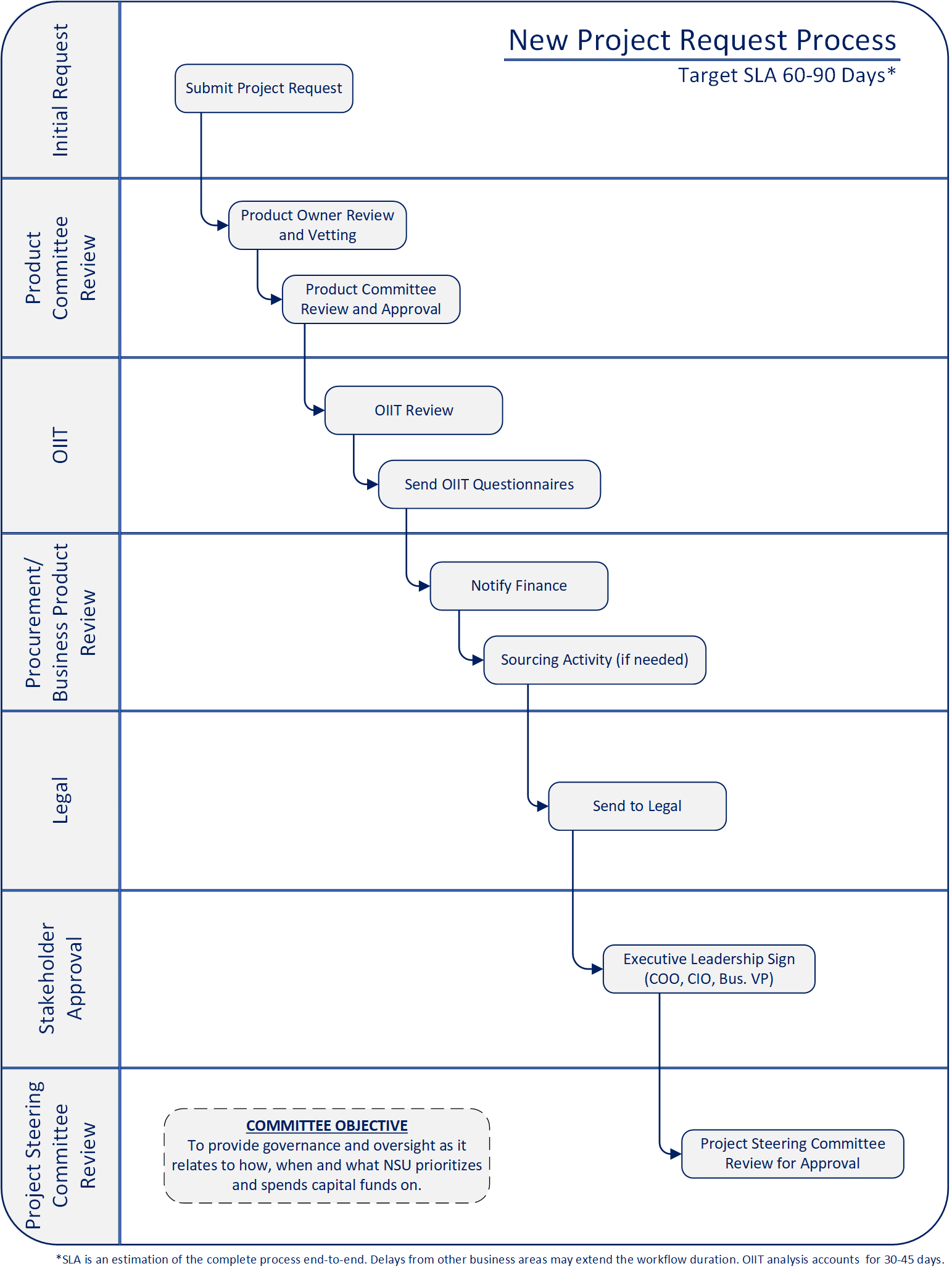
Note:
- These steps may occur in parallel but must be met before OIIT will approve/proceed with any project.
- Although a product/technology may be approved, that is not a start date for development.
Process Outcomes
Estimates
Approval/Signatures from
Why Can a Request be Denied?
Requests can be declined for one of the following reasons:
- Contracted resources were not approved
- There is currently an existing solution in NSU’s catalog of approved platforms that can satisfy this request
- This request was identified as a duplicate for something we already had in the queue
- A request may be rejected if funding is not available. Once funding is available it can be resubmitted for review
- Not compliant with NSU’s security standards HIPAA, FERPA, ADA, etc.

Product Support Requests
Please select your request type from the list of options below. Selecting the request link below each description will launch our intake form for you to fill out. Once your request has been submitted via the intake form, a confirmation email will be sent for your records. After our review, a team member will contact you to discuss your request in detail.
Application Support Issue
Experiencing an issue with an already existing application or system? Use the link below to open a ticket with NSU ServiceNow to address any issues with an application or system already in use.
Application Enhancement Request
Need a change to a current application? Use the link below to request an upgrade, update, or have a new feature implemented on an existing system (such as Milner or Sharklink).
Ariba Support Issues
Click below to submit a request for support within the Ariba system. Examples of support requests include user questions, system errors, bugs, etc.
Ariba Enhancement Request
Click below to submit a request for enhancement or modification within the Ariba system. Examples of Ariba requests include changes to approval flows, report creation/modification, new features, or updates to existing functionality.
Audio Visual / Videoconferencing Support Issues
Click below to report challenges relating to Audio Visual/Videoconferencing hardware and/or services.
Audio Visual / Videoconferencing Service Request Form
Click below to request Audio Visual (AV) or Videoconferencing Services.
Audio Visual Architecture Project Requests
All proposed AV projects require an on-site consultation with a member of the OIIT AV Architecture Team and will be defined as an Internal Installation/upgrade by the OIIT AV Architecture Team or as an Outsourced Installation/Upgrade that will then follow the RFP process with the Office of Procurement to find an external AV Integrator to meet your project needs. Estimates will include total estimated cost of the AV components, AV installation costs (if outsourced) and AV Infrastructure estimates for power and data as applicable. All requests are processed in the order in which they are submitted.
Banner Support
Selecting this option will allow you to submit production errors or incidents within the Banner system or operational requests. These requests include: systems or processes not working or running, research into unexpected results from the Banner applications or custom processes, request to start or stop scheduled jobs, change parameters or run a process on demand, requests for minor configuration changes in the Banner application and general questions.
Request Intake
Selecting one of these options will allow you to submit a request for new features, functionality or modifications within the Banner system.
Examples of Banner requests include the following:
Banner Non-Project Development:
- New integrations between Banner and external or existing internal systems
- Data extracts for third party vendors, new batch processes or modifications to existing batch processes
Banner Upgrade:
- New request for a standard Banner maintenance
- Examples include Ellucian non-compliance/regulatory releases
Banner Capital Project:
- New request for a Banner-related project effort
- Examples include the Banner 9 initiative of specific modules, enhancements to the development lifecycle Banner Workflows
Canvas Support Issues
Use this option to submit Support requests for the Canvas System. Examples of support requests include user questions, system errors, course content requests or any related system issues with the Canvas System.
Canvas Requests
Use this option to submit a request for enhancement or modification within the Canvas system. Examples of Canvas requests include report creation/modification, new features, or updates to current functionality.
Concur Support Issues
Click below to submit a request for support within the Concur application. Examples of support requests include user questions, system errors, bugs, etc.
Enhancement Request
Click below to submit a request for enhancement or modification within the Concur. Examples of Concur requests include changes to approval flows, report creation/modification, new features, or updates to existing functionality.
New DocuSign Account Request
Click below to open a ticket for a New DocuSign account request.
Submit DocuSign Account Request
New Docusign Templates and Power Forms
Click below to open a ticket with New DocuSign Templates and Power Forms.
Submit DocuSign Template and Power Form Request
General Support or Need Support on DocuSign Account or Templates
Click below to open a ticket for DocuSign General Support or Need Support on DocuSign Account or Templates.
Submit DocuSign Support Request
Request DocuSign Usage Report
Click below to open a ticket to Request DocuSign Usage Report.
Mobile Software Development Issue
Click below to open a ticket with NSU ServiceNow to address an issue with a custom mobile application built by the university.
Submit Mobile Software Development Issue
Mobile Software Support Request
Submit this mobile software request for iShark modules and push notifications as well as NSU Spaces features.
New Project Request
Submit a request to initiate a project that requires OIIT for your department. If the technology is currently in production, please submit an Application/Software or Hardware service request ticket.
New Technology Analysis (Includes Hardware, Software, Infrastructure, Network Services and Telephone)
Submit a request for OIIT to analyze potential solutions for implementation within the college or university.
Recruit Support Issues
Use this option to submit Support requests for the Recruit System. Examples of support requests include system errors, waiver codes, new employees, updating user access, or any related system issues with the Recruit System.
Submit Recruit Support Request
Recruit Requests
Use this option to submit a request for an enhancement or modification within the Recruit system. Examples of Recruit requests include new communication plans, new features, system configuration, updates to current functionality, or significant revisions to existing communication plans or territories.
Broken Report Issues
This option is for submitting a request to investigate an already developed and deployed report because you believe it is not working correctly or you believe it is returning incorrect data.
New Report Request
This option will allow you to submit a request to develop a new one-time or recurring report using SQL Reporting Services or MSExcel that may be published to SharePoint, Email or requested on-demand.
Software Development Support
Click below to open a ticket with NSU ServiceNow to address an issue with a custom application built by the university.
Submit Software Development Issue
Software Development Request
Click below to submit a request for the creation and/or modification of web or integration software that cannot be otherwise purchased from a vendor and requires programming from the software development team. Examples include Dissertation collaboration, PayTrax, and Course Wizard.
Access to Web Application
Select this option to request access to the applications supported by the Web Team: Blackboard Connect, CMS, CampusPress, Opinio, Sharklink or Webform.
Submit Web Application Access Request
Website or Webpage
Websites and webpages are developed using a content management system. Content owners will be requested to manage all future content changes. All website and webpage request must first be directed to site contact owners. If no owner, submit a website or webpage request here.
Submit Website or Webpage Request
Opinio Survey
Select this request to create now or make changes to an existing Opinio Survey.
Mass Email
Select this request to have a mass email created and/or sent out to the NSU population.
Cludo Website Search
Submit this form to request any items regarding Cludo Website Search.
CampusPress
Select here to submit a request to update user information, add users(s) to and existing site, create a new or modify and existing Campus Press site.
FlippingBook
Select this request to create a new Flippingbook or to make modifications to an existing one.
uPay or Web Form
Submit this to request a new form, updates to an existing form or to open or close a uPay/Web form.
Submit uPay or Web Form Request
Touchnet Marketplace
Select here to submit a request for a new online store, new uPay Site, modifying uPay site settings, resubmitting a transaction or if you need to make a general request regarding Touchnet Marketplace.
Submit Touchnet Marketplace Request
Sharklink
Select this request to do the following Sharklink items: Create a new site, create a page or portlet, updated content, access, set audience security or report data inconsistency.
Can't Find What You are Looking for?
Use the button below to visit our NSU ServiceNow portal for a full list of the request
queues we have available for support.